- Introduction
- Why Multi-City SEO Matters
- How to Appear in Multiple City Searches with One Website
- 1. Start with Location-Based Keyword Research
- 2. Create Location-Specific Landing Pages
- 3. Optimize On-Page SEO for Each City
- 4. Build Local Backlinks for Each Location
- 5. Optimize Google Business Profile (GMB)
- 6. Use Schema Markup for Local SEO
- 7. Create City-Specific Content
- 8. Improve Internal Linking
- 9. Optimize for Mobile and User Experience
- 10. Track Performance and Improve
- Common Mistakes to Avoid
- Real Example
- Conclusion
- Frequently Asked Questions
Introduction
If you’re trying to grow your business in multiple locations, you’ve probably asked: “How can I rank in multiple cities with just one website?”
This is one of the most common challenges in local SEO. Many businesses want to expand their reach without creating separate websites for every city. The good news is—you can target multiple cities effectively with a single website if you follow the right strategy.
In 2026, local SEO is not just about adding city names to your pages. Search engines now focus on relevance, user intent, and local authority. This means your approach must be strategic, authentic, and value-driven.
This guide will walk you through proven techniques to help your website appear in multiple city searches, attract targeted traffic, and generate more leads.
Why Multi-City SEO Matters
Expanding Your Reach
Targeting multiple cities allows your business to reach a wider audience and generate more opportunities without increasing infrastructure costs.
Competing Locally at Scale
Instead of competing globally, multi-city SEO helps you rank in smaller, location-specific markets where competition may be lower and conversion rates higher.
How to Appear in Multiple City Searches with One Website
1. Start with Location-Based Keyword Research
Understand What People Search
To rank in different cities, you must identify keywords people actually use, such as:
- “SEO services in Delhi”
- “best digital marketing agency in Gwalior”
- “plumber near me in Lucknow”
Focus on Intent
Target keywords with clear intent:
- Service + city keywords
- “Near me” searches
- Long-tail local keywords
This ensures you attract users who are ready to take action.
2. Create Location-Specific Landing Pages
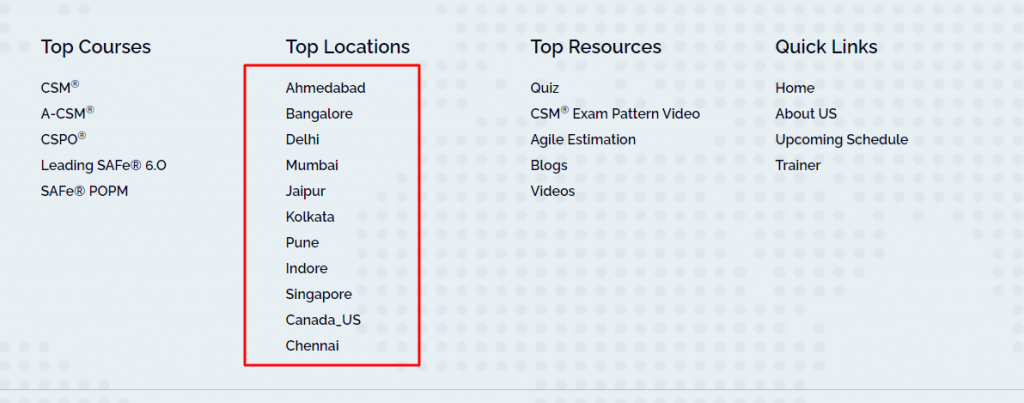
One Page Per City
The most effective strategy is to create separate landing pages for each city you want to target.
Example:
- /seo-services-delhi
- /seo-services-mumbai
- /seo-services-lucknow
Avoid Duplicate Content
Each page must have unique content. Do not just change the city name.
Include:
- City-specific introduction
- Local problems and solutions
- Area-specific services
- Testimonials from that region (if possible)
This helps search engines understand that each page is valuable and relevant.
3. Optimize On-Page SEO for Each City
Key Elements to Optimize
For every city page, optimize:
- Title tag (include city keyword)
- Meta description
- Headings (H1, H2)
- URL structure
- Image alt text
Example
Instead of a generic title:
“Best SEO Services”
Use:
“Best SEO Services in Delhi for Business Growth”
This improves both rankings and click-through rate.
4. Build Local Backlinks for Each Location
Why Backlinks Matter
Backlinks are one of the strongest ranking factors. For multi-city SEO, local backlinks are even more powerful.
Where to Get Them
- Local business directories
- City-based blogs
- News websites
- Industry listings
Focus on quality over quantity. A few strong local backlinks can significantly improve your rankings.
5. Optimize Google Business Profile (GMB)
Create or Manage Listings
If you have multiple physical locations, create a Google Business Profile for each city.
If You Have One Location
You can still optimize your profile by:
- Adding service areas
- Updating categories
- Posting regularly
- Collecting reviews
Why It Matters
Google Business Profile helps you appear in:
- Local map pack
- “Near me” searches
- Google Maps
6. Use Schema Markup for Local SEO
What is Schema Markup
Schema markup is structured data that helps search engines understand your business details.
What to Include
- Business name
- Address
- Phone number
- Service areas
Using Local Business schema improves your chances of appearing in rich results.
7. Create City-Specific Content
Go Beyond Landing Pages
Publishing blog content for each city helps build authority.
Content Ideas
- “Top SEO services in Delhi”
- “How businesses grow in Mumbai with SEO”
- Local case studies
Why It Works
This approach signals relevance and helps you rank for more keywords related to each city.
8. Improve Internal Linking
Connect Your Pages
Link your city pages to each other and to relevant blog posts.
Benefits
- Better crawlability
- Improved user navigation
- Higher page authority
Internal linking strengthens your overall SEO structure.
9. Optimize for Mobile and User Experience
Mobile-First Approach
Most local searches happen on mobile devices.
Focus Areas
- Fast loading speed
- Responsive design
- Easy navigation
A better user experience leads to higher engagement and better rankings.
10. Track Performance and Improve
Use SEO Tools
Monitor your performance using tools like:
- Google Analytics
- Google Search Console
What to Track
- Traffic by city
- Keyword rankings
- Conversion rates
Optimize Continuously
SEO is not a one-time process. Regular updates and improvements are necessary for long-term success.
Common Mistakes to Avoid
1. Duplicate Content Across City Pages
Copying the same content with different city names can harm your rankings.
2. Ignoring Search Intent
Using keywords without understanding user intent leads to poor conversions.
3. Over-Optimizing Keywords
Keyword stuffing can negatively impact your SEO performance.
4. Not Building Local Authority
Without local backlinks and content, it becomes difficult to rank in multiple cities.
Real Example
Let’s say you run a digital marketing agency.
Instead of one generic page, you create:
- SEO services in Delhi
- SEO services in Mumbai
- SEO services in Bangalore
Each page targets a specific audience with tailored content.
Result:
- Higher rankings
- More targeted traffic
- Better conversions
Conclusion
Appearing in multiple city searches with one website is completely achievable with the right SEO strategy.
By focusing on location-based keywords, creating unique city pages, optimizing on-page SEO, and building local authority, you can expand your reach and attract more customers.
In 2026, success in local SEO depends on relevance, quality, and user experience. If you focus on providing real value to each location, your website will naturally perform better in search results.
Related Blogs:
Local SEO Audit Guide: Checklist, Tool, and Template
Viral Marketing Strategies in 2026 (What’s Actually Working, Not Just Talk)
Frequently Asked Questions
Can one website rank in multiple cities?
Yes, by creating location-specific landing pages and optimizing them with local SEO strategies, a single website can rank in multiple cities.
How many city pages should I create?
Create pages for cities where you actually offer services. Avoid creating unnecessary pages just for rankings.
Is Google Business Profile necessary?
Yes, it plays a major role in local SEO and helps you appear in map results and local searches.
How do I make content unique for each city?
Add local details, examples, and services relevant to that specific city instead of copying content.
Do backlinks help in multi-city SEO?
Yes, especially local backlinks from city-specific websites improve your rankings significantly.